A building permit history lookup by address is a local search, not a national one. There is no federal permit database, no single site that covers every jurisdiction, and no lookup that works the same way in two neighbouring counties — which is why the first and hardest step is establishing which office actually holds the records for the address you care about.
It is worth doing before closing. Unresolved permits and unpermitted structural changes lead to municipal fines, contested homeowners insurance claims, and corrective construction paid for by whoever owns the house at the time — which becomes you.
While many buyers assume that a standard home inspection or a title search will automatically uncover permit discrepancies, this is rarely the case. Title companies focus on liens and ownership disputes, while home inspectors evaluate the physical condition of the property rather than its administrative history. To protect yourself, you must learn how to navigate local government archives and interpret the records you find.
Finding the Right Local Authority
Free to use with credit (CC BY 4.0)
You can use this diagram on your own website, in an inspection report or in training material, including commercially. The one condition is credit to Before Regret as the source. License terms
Or download the image and credit it as “Diagram: Before Regret” with a link to this page.
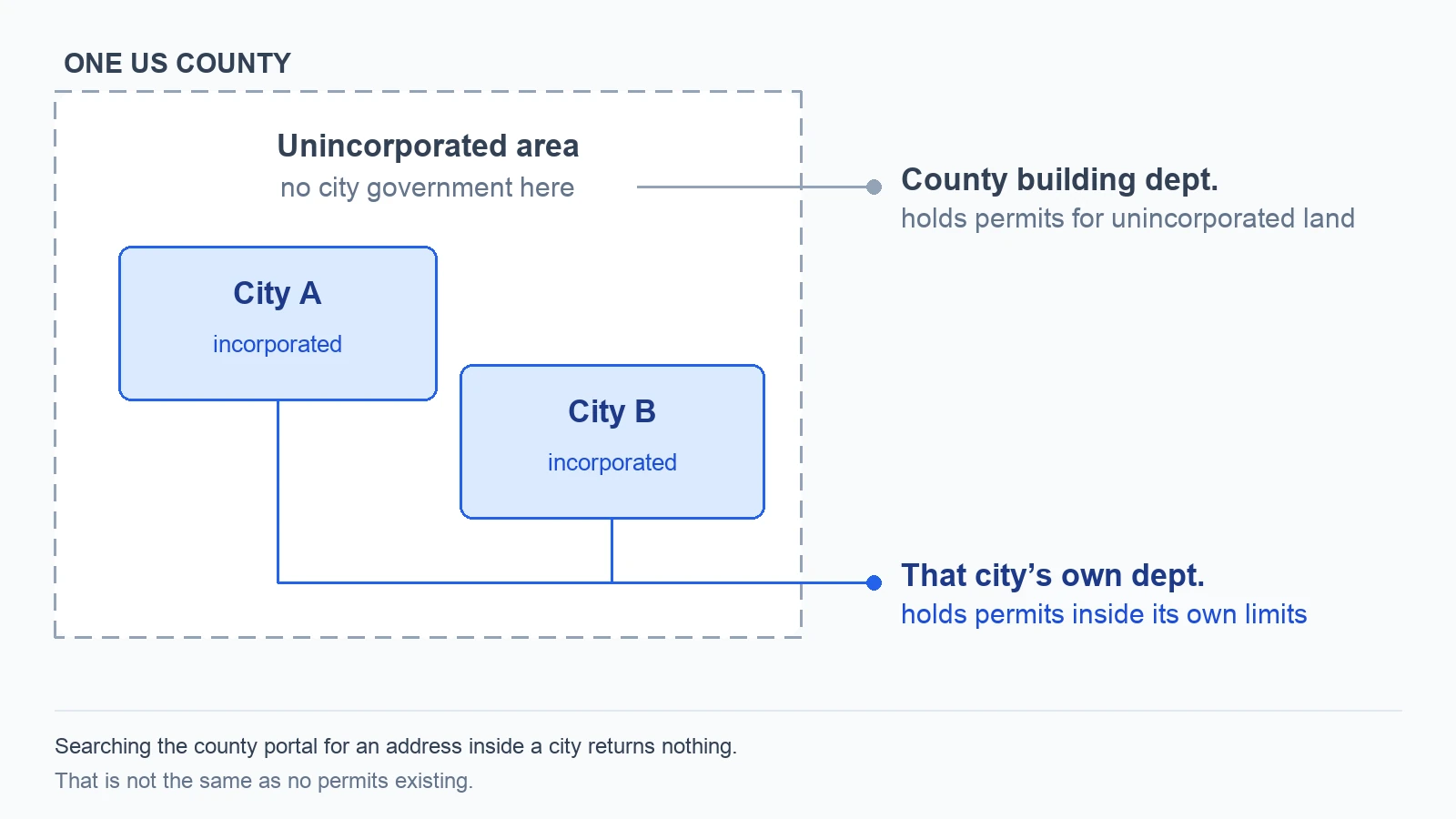
Before you can search for permits, you must identify the exact government entity that has jurisdiction over the property. This is not always as straightforward as looking at the mailing address.
Many properties have a postal city name but actually sit in unincorporated territory, meaning the county government manages the building department. Conversely, some small municipalities contract their building inspections out to neighboring cities or county offices.
To find the correct authority, use these steps:
- Check the County Tax Assessor’s Website: Look up the property on the local county tax assessor's portal. The tax record will typically list the "taxing district," "jurisdiction," or "municipality."
- Identify Unincorporated Areas: If the tax record indicates "unincorporated" or lists a county district, your permit search must go through the county building department.
- Identify Incorporated Cities: If the tax record lists a specific city or township, that local municipality’s building department is your starting point.
If you are still unsure, a quick call to the county clerk's office can clarify which building department holds the historical records for the parcel.
Navigating the Online Permit Portal
Most modern municipalities host an online database, often called a "Citizen Access Portal," "Permit Search," or "e-Permits system." These databases are frequently built on third-party software platforms, but they all operate on similar search principles.
When searching these databases, formatting is critical. Online search engines for building departments are notoriously rigid and do not use the sophisticated search algorithms of modern web search engines. If you type "123 North Main Street," the system may return zero results, whereas "123 N Main St" or simply "123 Main" will bring up the record.
If the street address search fails, try searching by the Parcel ID or Assessor’s Parcel Number (APN). You can find this number on the county tax assessor's property card. Because the APN is a unique identifier tied directly to the land, it bypasses any address spelling, abbreviation, or direction-prefix discrepancies.
Is There a Historical Building Permits Database?
No — not a national one. There is no historical building permits database covering the United States, and in most states no state-level equivalent either. Permits are issued by individual cities and counties, each keeping its own records in its own system, and no higher authority consolidates them. When people search for a historical building permits database they usually mean one of two things: their own jurisdiction's portal, which does exist in most places, or a commercial aggregator, which resells whatever subset of jurisdictions publish machine-readable data and is rarely complete or current.
The more useful question is how far back the local record reaches. Where a portal exists, its coverage generally begins at digitisation — commonly the late 1990s or early 2000s — so for anything built before then the online record is partial by construction. If you are researching an older home, historical permits for major structural changes, electrical overhauls, or plumbing repipes may only exist on microfiche, paper cards, or legacy systems. The gap bites hardest where it is least convenient: in counties where much of the housing predates 1950, the decades that matter most for structural and electrical work sit entirely behind the counter.
One near-miss is worth naming, because the two get confused. A CLUE report does draw on a genuinely national system — but it holds seven years of insurance claims rather than permits, and a buyer cannot order one for a house they do not yet own. Different question, different office, and no substitute for the building department.
Some smaller or rural jurisdictions do not offer online permit searches at all. If you encounter a digital dead end, you have several options:
- Submit a Public Records Request: Most states have open records laws (such as the Freedom of Information Act or state-specific equivalents) that require local governments to provide public records upon request. You can typically submit these requests online or via email to the city or county clerk.
- Visit the Building Department in Person: Walking into the local building department is often the fastest way to access older records. Staff members can pull physical files, microfiche, or internal databases that are not accessible to the public online.
- Request a Property File Review: Some municipalities allow buyers or their agents to schedule an appointment to review the complete physical file for a specific address.
Be prepared for potential delays. While online searches are instantaneous, manual record retrievals can take anywhere from a few days to several weeks, depending on the department's workload and the age of the records.
Deciphering Permit Statuses
Finding a permit record is only half the battle; you must also understand its status. A permit is merely an application for permission to perform work. It does not prove the work was completed safely or inspected by a professional.
| Permit Status | What It Means | Implications for a Buyer |
|---|---|---|
| Applied / Under Review | The contractor or owner submitted plans, but the building department has not yet authorized the work to begin. | No physical work should have started under this permit. If work has begun, it may be unauthorized. |
| Issued / Active | The building department approved the plans, and work is legally allowed to proceed. | The project is ongoing, and final inspections have not yet occurred. |
| Expired / Void | The permit was issued, but the work was either not started or not completed within the required timeframe (often six months to a year). | This is a major warning sign. Work may have been completed without a final safety inspection. |
| Finaled / Closed | The work was completed, a municipal inspector reviewed the project, and it met local building codes. | The work is legally resolved and documented as compliant. |
An "Expired" or "Open" permit is a common issue during real estate transactions. It indicates that a homeowner started a project—such as adding a deck, replacing a water heater, or upgrading an electrical panel—but never called the city back for a final inspection.
To resolve this, a licensed contractor typically must pull a renewal permit, expose the work (which can involve cutting into drywall or digging up footings), and schedule a final inspection with a municipal inspector.
Open Permit Search by Address
An open permit search by address is the same lookup narrowed to one question: not what was built here, but what was started here and never signed off. It is worth running deliberately, because it is the commonest real finding in permit research and the easiest to read past.
Run the search, then filter by status. Few portals offer a dedicated open-permit filter. Most return the property's entire permit history and leave you to read the status column, which is why the step is skipped so often — the record is right there, in a list of twelve rows, in a column nobody told you mattered. Sort or scan by status rather than by date.
Treat more than one status as open. This is where the search usually fails. "Expired" is not "closed": an expired permit is an open permit that ran out of time, and the work behind it was never inspected either. Depending on the jurisdiction, issued, active, in progress, pending final, pending inspection and expired all describe a file the municipality has not finished with. Only an explicit finaled, closed, completed or CO-issued status means the department signed off.
Search by address, not by owner name. Permits attach to the property and outlive the people who pulled them. An owner-name search returns what the current seller filed and silently omits everything the three owners before them left open, which is generally the older and more interesting half of the record.
Know what an empty result means. No open permits found is a narrower statement than it sounds. It means nothing is open in that system for that address format — it does not mean the work was permitted, because work done with no permit at all leaves no open permit behind. An empty result and a clean house are different findings.
Why it matters more to a seller than they expect
Buyers run this search to price a risk. Sellers often meet it as an emergency: the buyer's title company flags an open permit from 2009, and the closing cannot proceed until the file is resolved. Resolution runs through the same municipal queue as any other inspection, so it is measured in weeks — a renewal permit, sometimes exposing finished work, then an inspection slot. Where the open item is a deck, which is the commonest one, the after-the-fact permit process sets out what the department will want to see.
Running the search early is what turns that emergency into a scheduling problem.
What to Look For in a Permit Record
When you successfully retrieve a permit history, do not just look at the list of dates. Dig into the specific details of each record to build a clear picture of the home's history:
- The Scope of Work: Read the detailed description of what the permit allowed. If a permit was pulled for a "bathroom remodel," but the home now features a newly added second-story master suite, the major structural work was likely done without a permit.
- The Listed Contractor: Note whether the work was performed by a licensed professional or an "owner-builder." Owner-builder permits are common when homeowners tackle projects themselves. While legal, DIY work carries a higher risk of amateur workmanship and code violations, which are recorded separately from permits — searching a property's enforcement history is a second lookup, not part of this one.
- Inspection Notes and Correction Notices: Look for a history of failed inspections. If a permit shows multiple failed electrical inspections followed by no final sign-off, the hazardous conditions may still exist behind the walls.
- Sub-Permits: Major renovations usually require separate sub-permits for electrical, plumbing, and mechanical (HVAC) work. If you see a general building permit for a home addition but no accompanying electrical or plumbing permits, those critical systems may have been installed illegally.
The Difference Between a Permit and a Certificate of Occupancy
It is important to distinguish between individual trade permits and a Certificate of Occupancy (CO) or Certificate of Completion.
While an electrical or plumbing permit covers a specific system, a CO is a comprehensive document issued after a new home is built or a major addition is completed. It certifies that the entire structure complies with local building codes, zoning laws, and safety regulations, making it legally habitable.
If a major structural addition lacks a final CO, you may face challenges securing financing, as many lenders will not underwrite a mortgage on a property with unresolved occupancy issues.
Spotting the Gap: How to Identify Unpermitted Work
The absence of a permit record can be more telling than the presence of one. Homeowners frequently perform renovations without obtaining the necessary permits to save money, avoid delays, or prevent property tax increases.
To spot unpermitted work, compare the building department's permit history against two other resources:
1. The County Tax Assessor’s Property Card
Compare the square footage, room counts, and stories listed on the tax card with the active real estate listing. If the listing advertises a "fully finished basement with a full bathroom," but the county tax assessor lists the basement as "unfinished" and there are no plumbing or electrical permits on file, the work was likely completed without municipal oversight.
2. Physical Evidence of Recent Renovations
Look for signs of major upgrades that typically require municipal oversight, such as:
- Brand-new central air conditioning units
- Recently replaced water heaters or furnaces
- Structural wall removals (often indicated by sagging ceilings or unaligned flooring)
- New decks, retaining walls, or accessory dwelling units (ADUs)
- Whole-house solar panel installations
For homes built before 1978, certain renovations that disturb lead-based paint require certified contractors to follow specific containment protocols [EPA]. The absence of a permit for a major renovation in an older home increases the likelihood that these safety measures—and other code requirements—were ignored.
Next Steps for Home Buyers
If your research reveals open permits, expired filings, or significant unpermitted renovations, do not attempt to resolve these issues with the building department yourself before closing. Initiating a formal inquiry or complaining to code enforcement while the property is still under contract can trigger fines, stop-work orders, or condemnation proceedings against the property before you even own it.
Instead, route your findings to the appropriate licensed professionals to protect your interests:
- Consult a Real Estate Attorney: Ask your attorney to draft an inspection response requiring the seller to close out all open permits, secure retroactive permits, or obtain a Certificate of Occupancy before the closing date.
- Hire a Licensed Home Inspector: Share your permit findings with your home inspector. They can pay special attention to areas with unpermitted work to evaluate if the construction meets basic safety standards.
- Consult a Licensed Contractor or Structural Engineer: If you are considering buying the home "as-is" despite the unpermitted work, have a licensed contractor or structural engineer evaluate the structure. They can provide an estimate of what it will cost to bring the unpermitted modifications up to current local codes.
Permit Records by County
Detailed, step-by-step permit search guides are available for these counties:
- Philadelphia County, PA
- Cook County, IL
- Miami-Dade County, FL
- San Bernardino County, CA
- The Bronx, NY
- Middlesex County, MA
- Los Angeles County, CA
- Harris County, TX (Houston)
- Maricopa County, AZ (Phoenix)
- San Diego County, CA
- Clark County, NV (Las Vegas)
- Orange County, CA (Anaheim)
- Dallas County, TX
- Riverside County, CA
- Queens, NY
- Tarrant County, TX (Fort Worth)
- Hillsborough County, FL (Tampa)
- Kings County, NY (Brooklyn)
- Broward County, FL (Fort Lauderdale)
- Santa Clara County, CA (San José)
- New York County, NY (Manhattan)
- Sacramento County, CA
Don't see your county? The steps in "Finding Your County's Portal" above work the same way almost everywhere -- the portal names change, the underlying process doesn't.
One increasingly common reason to search a permit before closing is insurance: carriers now routinely ask buyers to prove how old the roof is, and the roofing permit is often the strongest free evidence there is.